One Portal, Every Cluster: Multi-Cloud Kubernetes Management with Centralized RBAC
A follow-up to the paved road: one management portal for Kubernetes clusters on any managed provider, with centralized RBAC driven by your existing identity provider, and when Rancher is worth adding to get there.
This is a follow-up to The Paved Road: Multi-Cloud GitOps for Platform Engineering. That article covered how changes reach clusters. This one covers how people reach them.
GitOps for deployments, Rancher for people
On the paved road, nobody runs kubectl apply against production. CI builds, Argo CD deploys, and Git is the only way a change gets into a cluster.
People still need to get into clusters, though. Developers read logs and exec into pods while debugging, SREs investigate incidents, and support checks what is running where. The paved-road article named “RBAC and tenancy boundaries” as one of the things real adoption still needs. This article picks that up.
Clusters rarely stay on one provider. A typical SaaS fleet ends up on several managed Kubernetes services, such as Amazon EKS, Azure AKS, Google GKE, and Oracle OKE, across several environments and regions. The goal is one identity source and one RBAC model for every cluster, so that access works the same way regardless of where a cluster runs.
The examples below use AKS and EKS, because that is what the reference implementation runs, but the approach applies to any mix of managed Kubernetes services.
Why unified access gets hard
- The cluster count grows quickly. Every environment × provider × region is a cluster. Four environments × two providers × three regions is already 24 clusters.
- Each provider authenticates differently. AKS uses Microsoft Entra ID, EKS uses AWS IAM and access entries, and GKE uses Google Cloud IAM. Each needs its own setup, kubeconfig flow, and RBAC mapping.
- Joiners and leavers touch many systems. Without a common layer, onboarding or offboarding a person means changes on every provider and many clusters.
- Audit is scattered. Who accessed what lives in each provider’s audit log (Azure activity log, AWS CloudTrail, Google Cloud Audit Logs) and in each cluster’s API server audit log.
| Provider | Native access | Mapping model |
|---|---|---|
| AKS | Microsoft Entra ID integration | Entra groups → Kubernetes RBAC or Azure RBAC |
| EKS | IAM Identity Center + access entries | Permission sets → IAM roles → access entries / Kubernetes RBAC |
| GKE | Google Cloud IAM + Google Groups for RBAC | Google groups → Kubernetes RBAC or Cloud IAM roles |
Relying only on native access gives you one mapping model and one kubeconfig flow per provider. Every new cluster, region, or team has to be wired up once per provider, and the setups drift apart over time.
Start with the identity provider you already have
Everything below assumes a single corporate identity provider (IdP) as the source of truth for users and groups. This article uses Okta as the example, but use whichever IdP your company already runs: Microsoft Entra ID, Okta, Google Workspace, Keycloak, or another SAML or OIDC provider. The pattern doesn’t change, only the name of the integration.
The rule is simple: access is granted to IdP groups, never to individual users, and group membership is managed in the IdP. Clusters and tools only consume those groups.
Options
| Option | How it works | Trade-off |
|---|---|---|
| Native per-provider | Each provider’s own integration (Entra ID for AKS, IAM for EKS, Cloud IAM for GKE), federated from your IdP | No extra components, but one model per provider to keep in sync |
| Generic OIDC | Cluster API servers trust your IdP (directly, or through Dex or Pinniped) as an OIDC issuer; RoleBindings managed in Git | Uniform, but OIDC has to be configured on every cluster, and there is no central UI or audit |
| Access proxy | Teleport (or similar) brokers kubectl access | Strong auditing, but another product to license and run |
| Rancher + your IdP | Rancher authenticates through your IdP and proxies access to every registered cluster | One login, one RBAC model, central audit, but Rancher is an extra critical component |
The rest of this article focuses on Rancher, for teams that want a common management portal across clusters and centralized RBAC. Treat it as an optional layer for human access that you add when the fleet is big enough to justify it, not as a day-one requirement.
Rancher as the human access layer
Rancher is an open-source Kubernetes management platform from SUSE. It can import existing clusters from any provider and put them behind one UI, one login, and one RBAC model, without changing how those clusters are provisioned or deployed to.
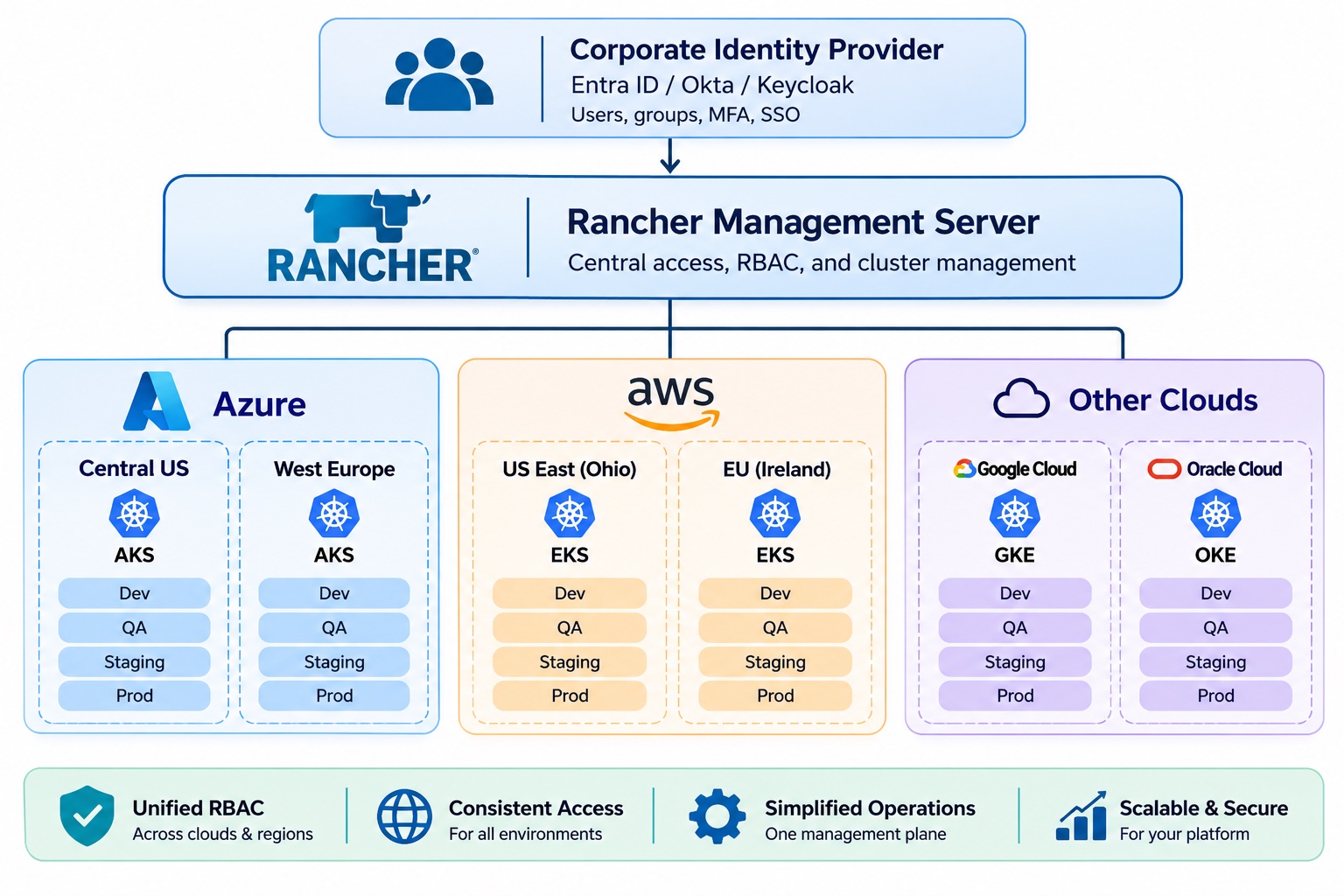 One identity provider and one management portal, with the same RBAC across every cloud, region, and environment
What Rancher gives you:
- One login through your IdP, one UI for all clusters on every provider, and the same kubeconfig flow for each of them. Rancher issues a kubeconfig per cluster, and you can merge them into one file.
- One place to map IdP groups to roles per cluster or per project.
- One audit trail of who accessed what through Rancher, once you enable Rancher’s API audit log (it is off by default).
- No provider-specific tooling (
azandkubelogin,aws eks,gcloud) for developers and support. - Works with private clusters, with no inbound ports opened to them (see below).
What it doesn’t do:
- It doesn’t deploy. Keep per-cluster Argo CD exactly as on the paved road.
- It doesn’t replace cloud IAM for admins, Terraform, or CI.
- It doesn’t remove direct access. You still need break-glass access, an emergency path that goes straight through each provider’s IAM.
How it works
Rancher runs on a dedicated tools cluster, a small cluster that hosts platform tooling rather than application workloads. Each managed cluster runs a Rancher agent (cattle-cluster-agent) that keeps an outbound tunnel open to Rancher. Here is what happens when a developer runs kubectl:
sequenceDiagram
    autonumber
    actor U as User (kubectl / UI)
    participant R as Rancher (tools cluster)
    participant O as IdP (e.g. Okta)
    participant A as Rancher agent (cattle-cluster-agent)
    participant K as Cluster API server (AKS / EKS / GKE)

    U->>R: Login
    R->>O: Redirect (SAML / OIDC)
    O-->>R: Assertion: user + groups
    R-->>U: Rancher token (kubeconfig points at Rancher)
    U->>R: kubectl get pods -n orders
    R->>R: Validate token, resolve groups, check bindings
    R->>A: Forward via agent tunnel
    A->>K: Request with Impersonate-User / Impersonate-Group
    K->>K: Native Kubernetes RBAC (synced by Rancher)
    K-->>A: Response
    A-->>R: Back through the tunnel
    R-->>U: Response
Private clusters, no inbound ports
Production clusters usually have a private API server: it is reachable only from inside the cloud network, not from the internet. That doesn’t stop Rancher from managing them, because the connection runs the other way.
- The agent dials out. The Rancher agent in each cluster opens an outbound, long-lived WebSocket connection over HTTPS (port 443) to the Rancher server.
- Rancher replies through the tunnel. Every request Rancher sends to the cluster, including your
kubectlcalls, travels back down that same connection. Rancher never opens a connection into the cluster. - Result: a private AKS cluster (or a private EKS or GKE cluster) can be onboarded with no inbound ports opened to the cluster or its API server.
What you still need:
- Outbound 443 from the cluster to the Rancher URL. Allow it in the egress firewall or NAT, make sure the Rancher hostname resolves, and use a certificate the agent trusts.
- Inbound 443 on Rancher itself, from the agents and from your users. Rancher is the one endpoint that has to be reachable.
Registration is automated. The agent is installed from a per-cluster registration manifest. In the reference rancher-register module, the same terraform apply that creates the cluster also registers it in Rancher and applies that manifest with the cluster’s own credentials. The pipeline that provisions the cluster already has a path to its API server, so onboarding to Rancher adds no manual step and no extra network access.
Authentication
- The IdP authenticates the user and returns their group memberships in the SAML assertion or OIDC token. The IdP application needs to send a groups attribute, and Rancher’s auth config must name that field.
- Rancher refers to users and groups as principals. With Okta, a group looks like
okta_group://team-alpha. The prefix depends on which IdP Rancher is configured with. - The user’s kubeconfig points at Rancher, not at the provider’s API server. No provider IAM is involved in this path.
- Group membership is cached in Rancher. For most providers Rancher refreshes it on a schedule, by default hourly when the user is active plus a daily resync. SAML providers are the exception: Rancher can’t look users up through SAML, so it refreshes their groups only when they next log in to the Rancher UI. Removing someone from an IdP group therefore doesn’t instantly revoke a Rancher token they already hold. For urgent offboarding, also disable the user in Rancher and delete their API tokens.
Authorization
Rancher bindings attach an IdP group to a role at one of three scopes. Rancher-wide permissions, such as managing Rancher itself, come from a global role. Cluster and project permissions come from a role template, Rancher’s reusable role definition, which becomes a Kubernetes Role or ClusterRole on the cluster.
| Scope | Binding | Example |
|---|---|---|
| Rancher-wide | GlobalRoleBinding (to a global role) | Platform admins |
| Cluster | ClusterRoleTemplateBinding (CRTB) | SRE read-only on prod clusters |
| Project (a set of namespaces) | ProjectRoleTemplateBinding (PRTB) | Tenant team on its own namespaces |
Enforcement
- Rancher syncs the cluster and project bindings into native Kubernetes Roles and RoleBindings on each cluster.
- Rancher forwards each request through the agent tunnel using Kubernetes impersonation. The request reaches the API server as the user’s Rancher identity (an ID such as
u-abc123) and the group principals Rancher has mapped for them, not as the raw IdP username. The cluster’s own API server makes the final RBAC decision, the same way on every provider.
Mapping a project to an IdP group
On the paved road, each tenant is an application team with its own namespaces. In Rancher, a Project groups namespaces on a single cluster, so each tenant gets one project per cluster. A PRTB grants the tenant’s IdP group a role on that project:
| PRTB field | Value |
|---|---|
projectName | <clusterId>:<projectId> |
roleTemplateName | project-member, project-owner, or read-only |
groupPrincipalName | okta_group://team-alpha |
Choose the role per environment. project-member lets the group create, change, and delete workloads in its namespaces, which suits a sandbox. In production, where Git is the only way changes get in, bind read-only or a custom role that allows only viewing, logs, and exec. Otherwise the “Git only” rule is a policy that RBAC doesn’t enforce.
In Terraform, the rancher-register module registers each cluster with Rancher and creates one project per tenant, plus a PRTB for that tenant’s group (it binds project-member, since the reference stack is a sandbox):
1
2
3
4
tenants = {
  "team-alpha" = { group_principal_id = "okta_group://team-alpha" }
  "team-beta"  = { group_principal_id = "" } # creates the project with no binding
}
Tie-in with Argo CD: Argo CD creates each tenant’s namespaces and annotates them with field.cattle.io/projectId, so they land in the right Rancher project automatically. As a result, one IdP group membership grants access to exactly the namespaces Argo CD created, on every cluster and provider.
flowchart LR
    G[IdP group<br/>team-alpha] -->|PRTB| P[Rancher project<br/>team-alpha]
    P --> N1[ns: orders<br/>AKS sandbox cluster]
    P --> N2[ns: orders<br/>EKS sandbox cluster]
    Argo[Argo CD] -->|creates + sets projectId| N1
    Argo -->|creates + sets projectId| N2
The diagram simplifies one detail: Rancher projects are per cluster, so there is a team-alpha project on each cluster. Passing the same tenants map to every cluster’s registration creates the same project and PRTB on each one, so they stay identical.
What cloud IAM is still used for
| Concern | Mechanism |
|---|---|
| Provisioning (Terraform, CI) | OIDC federation from CI into each provider (for example, Azure workload identity federation and AWS IAM OIDC roles) |
| Workload identity | AKS workload identity, EKS IRSA or Pod Identity, GKE Workload Identity (for example, reading secrets or calling cloud APIs from a pod) |
| Image pulls | The node’s identity (AKS kubelet identity, EKS node IAM role, GKE node service account), not the pod’s |
| Break-glass | A small admin group with direct access through each provider, for when Rancher is unavailable. For example, an Entra admin group on AKS, or an IAM access entry plus the AmazonEKSClusterAdminPolicy access policy on EKS |
A Rancher outage does not stop deployments or running workloads, because Argo CD reconciles independently of Rancher. It only affects human access through Rancher, and break-glass access covers that gap. For private clusters, break-glass also needs a network path to the API server, such as a VPN or bastion, tested before you need it.
Should you add Rancher?
Consider it if:
- You want a common management portal across clusters and centralized RBAC.
- You have roughly 10 or more clusters across providers, or expect to.
- Developers, SREs, or support need hands-on access (logs, exec, debugging) across many clusters.
- Security or compliance (SOC 2 or similar) wants one access and audit point.
- Onboarding and offboarding across providers is already slow.
Skip it if:
- Few people need cluster access, and Argo CD, dashboards, and logs cover their needs.
- Your platform team is small and can’t take on running another critical system.
- You can solve access by federating your IdP into each provider’s IAM and managing
RoleBindings in Git.
How to adopt it safely
- Run it on a dedicated tools cluster, highly available and not shared with workloads.
- Use it for human access only. Argo CD and CI don’t go through it. Keep cluster registration optional in Terraform, so that “rebuild from Terraform and Git” still works while Rancher is down.
- Import the clusters. Don’t have Rancher provision them, because Terraform already does.
- Use your IdP as the source of truth. Map IdP groups to Rancher roles, and manage membership only in the IdP. Add “disable the user and delete their tokens in Rancher” to the offboarding runbook.
- Turn on the audit log. Enable Rancher’s API audit log, ship it to your log platform, and keep each cluster’s own audit logs as well.
- Keep break-glass access. A small admin group keeps direct access through each provider’s IAM, so a Rancher outage doesn’t lock you out.
- Limit direct access afterwards. If many people keep direct cloud access, Rancher’s audit and boundaries are bypassed.
Risks
- Rancher becomes a critical, high-privilege system. Its agents hold admin credentials on every cluster, so secure and patch it accordingly.
- A Rancher outage blocks the human path through it, though not deployments.
Recommendation
Start without Rancher while the fleet is small, and standardize on groups in your existing IdP, federated into each provider from day one. Add Rancher when you want a common management portal and centralized RBAC, or when the cluster count or volume of access requests makes the per-provider approach painful.
The paved-road design makes that a low-risk addition later. Deployments and workload identity never depend on Rancher, and registration can be switched off for a rebuild, so adding it touches only human access.
Reference implementation
- Platform Terraform (clusters, identity, Argo CD bootstrap, Rancher registration):
imkrupakar/platform-terraform - Platform GitOps (Argo CD control plane, tenant onboarding):
imkrupakar/platform-gitops - Rancher: communicating with downstream clusters
- Rancher: port requirements
- Rancher: users, groups, and membership refresh
- Rancher: API audit log
- EKS: access policies
- Rancher: authentication configuration
- AKS: Microsoft Entra integration
- EKS: access entries
- GKE: Google Groups for RBAC